Tuesday, December 12, 2017

What's next? After the Hour of Code


What's next?

After the Hour of Code 

Last Friday I did a whole school PD on the Hour of Code.  I enjoyed watching all of my colleagues and chatting with many of them about ways to bring coding into your classrooms. 

Computer Science and Coding can give students that “Eureka!” moment and an exciting feeling of empowerment! Build on that excitement and provide more opportunities for your students. Code.org offers teachers in grades K-5, high-quality, 1-day workshops, the next session is February 24, Boston Public Schools, 75 Malcolm X Blvd, Boston, MA 02120 Keep an eye on my PD list for more upcoming dates.

Thursday, December 07, 2017

Are you a Digital Addict?


Are you a Digital Addict?

Enter a number in the spaces below.

How many days this week have you . . .
 ______ Checked Twitter, SnapChat, Instagram, FB, etc before getting out of bed?

 ______ Had five minutes of Internet activity turn into more than 30 minutes?

 ______ Gone into the bathroom just to monitor your smartphone activity?

 ______ Texted while driving? Or read a Text while Driving?

 ______ Experienced FOMO (fear of missing out) because you weren’t familiar with a new Internet meme?

 ______ Texted while walking across the street?

 ______ Shared a photo of your dinner or your cat (or your cat eating dinner)?

 ______ Said the phrase, “Pics/video or it didn’t happen”?


How many times today have you . . .
 ______ Said, “Just a sec, I have to check my [email/Twitter/Facebook/Path]”?

 ______ Checked in to the same Starbucks?

 ______ Reached for your cell phone during a meeting, just for comfort?

 ______ Panicked because a coworker caught you playing a game?

 ______ Nearly walked into someone or something while checking your phone?

 ______ Used you phone from the toilet?

0–24: You keep doing you.

25–49: Turn your cell phone off for a few hours and see how that feels.

50+: We’re not saying you have a problem, but... well, your significant other might be saying you have a problem.

Tuesday, December 05, 2017

PBS Learning Media


PBS Learning Media

Over the summer I attended a Professional Development at PBS and learned about lots of great tools and resource that can be found on PBS.

Here are some of the resources that were showcased during my visit:

Tuesday, October 24, 2017

Backup and Sync


Backup and Sync

Backup and Sync from Googles an app for Mac and PC that backs up files and photos safely into Google Drive and Google Photos, so that they are no longer trapped on your computer and other devices. Just choose the folders you want to back up, and the app will take care of the rest.

Here are a few good articles on the ins and outs of Backup and Sync:

3 Things To Remember When Installing Google's New Backup and Sync App

Get started with Google's Backup and Sync app

Set up the Backup and Sync desktop app

Two Chrome Extensions

Classroom Split

Classroom Split is a Chrome Extension. "This Chrome extension is intended for students to use with Google Classroom. Clicking the Chrome extension icon opens up the Google Classroom assignments page side by side with the students work. Students can easily view their assignment directions while working. Students can right click on the Chrome extension and choose "Options" to change the default destination from the Google Classroom assignments page to another URL."

Whisper

Whisper is another Chrome Extension also for use with Google Classroom. It "lets you send quick messages to your class without interrupting the work. Whisper imports your list of students from Google Classroom, making setup super easy. Each message a teacher sends is also sent to his or her email (and automatically marked read and archived) so that Whisper is compliant with districts that archive teacher emails."

Tuesday, October 17, 2017

Google Drive Emojis


Google Drive Emojis


Emoji have managed to find their way into just about every aspect of our online lives these days — but the other day, I discovered that you can in fact add them to the names of your Google Drive Folders.

How to add Emojis to your folders? You just need to right-click the folder and click rename. Then go to this Copy Paste Character and copy the emoji you want, then paste it into the rename box.

I've even included a how to video this week in case that's a better way for you to learn ðŸ˜‰


Tuesday, October 10, 2017

Ada Lovelace Day


Ada Lovelace Day

The link above is to a wonderful BrainPOP on the English mathematician Ada Lovelace.  She is widely considered the world's first computer programmer for her invention of the computer algorithm. 

Born in 1815 to the poet Lord Byron and Anne Isabella Byron, Lovelace's mathematical talents led to an ongoing collaboration with mathematician Charles Babbage, who called Lovelace the "Enchantress of Numbers." While translating an article by an Italian engineer on Babbage's Analytical Engine, a proposed early version of a mechanical general-purpose computer, Ada added her own extensive set of notes which contained a tremendous breakthrough -- the first computer program or algorithm.
Lovelace is also credited with making the conceptual leap to develop a vision of the potential of computers to go beyond simply running calculations; in her notes, she raised questions about the possibility of individuals and society using technology as a collaborative tool. For example, in 1843, she speculated on the potential use of computers in music composition, writing: "Supposing, for instance, that the fundamental relations of pitched sounds in the science of harmony and of musical composition were susceptible of such expression and adaptations, the engine might compose elaborate and scientific pieces of music of any degree of complexity or extent." 

-From A Mighty Girl


Sites and Apps for Vocabulary and Spelling Practice - Best of 2016


Sites and Apps for Vocabulary and

Spelling Practice - Best of 2016

Building Language for Literacy, offers three language activities from Scholastic. It is Interactive White Board Ready and is web based. This is good for PK, K and possibly 1.

Spell Up is a Google Chrome Experiment. Spell Up is a game in which you hear a prompt to spell a word then have to speak into your laptop to see the word spelled on your screen. If you spell the word correctly it stays on the screen where it becomes part of a tower of words. If you spell a word incorrectly, it will fall off the screen and you will be prompted to try again (you can skip a word after a few tries). This app is great for students who can already spell many words s I would say grade 3 and beyond. There is no control as of yet over what words you're given.

web based  is a fun and challenging game that tests your ability to match definitions to words. You're given the first letter of the word and a definition and you need to spell out the word.  This would be great for grades 5 and 6.

Could you win the National Spelling Bee? Vox's spelling challenge presents you with the final winning words from twenty past national spelling bees. You will hear the word pronounced then you have to type it in the spelling box to submit your answer. Before submitting your answer you can hear the word used in a sentence and see the origin of the word. This could be fun for grade 6.

Wednesday, September 20, 2017

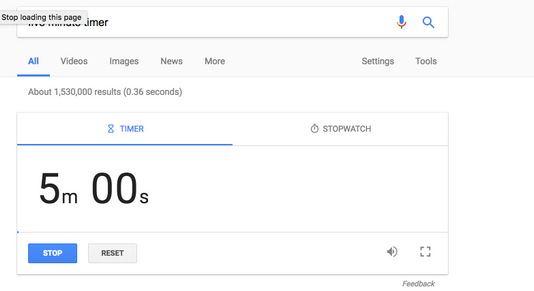
Five Minute Timer


Five Minute Timer

Did you know that you can set a timer on Google (and get an alarm to sound when time is up) by Googling any amount of time followed by "timer."

Tuesday, September 19, 2017

iMendi


iMendi

iMendi is a site for reviewing vocabulary words and phrases in eight different languages: Spanish, French, German, Italian, Portuguese, Arabic, Russian, and Czech. To use the site simply select a language and start flipping flashcard questions. You get two tries at the answering correctly on each card before iMendi gives you the correct answer.

If you want to focus on a specific set of vocabulary words, you can pick a specific lesson or word list from iMendi's menus that appear above every flashcard.

Tuesday, September 12, 2017

Museum of Fine Arts


Museum of Fine Arts

NEW this school year the MFA is offering FREE, yes FREE memberships to K-12 Teachers! "Receive free admission with proof of active teaching status. Visit any MFA ticket desk and present your current school ID or a letter from the principal or head of school on letterhead. You will also be asked to provide your e-mail address....For even more benefits, become an MFA Member with a $30 discount for teachers."

Thursday, September 07, 2017

Google Hacks


Google Hacks

Not necessarily educational but very interesting and fun Google Hacks I came across over the summer.  Enjoy!

If you search "spinner," Google will give you an interactive fidget spinner to play with.

If you search "the answer to life, the universe, and everything," Google's calculator will tell you it's "42." This is a reference to The Hitchhiker's Guide to the Galaxy, in which a supercomputer calculates that the answer to the ultimate question of life, the universe, and everything is 42.

Search the word "anagram," and Google jokingly asks if you meant "nag a ram."

Search the word "askew," and Google appears tilted.

If you search "fun facts" or "I'm feeling curious," Google will provide you with a fun fact. You can then click "Ask another question" for more random facts.

If you search the phrase "Google in 1998," the results will appear in Google's 1998 layout.

If you google "Sonic The Hedgehog," you'll see Sonic standing to the side. If you click on him, he jumps — and if you click on him 25 times, he turns into Super Sonic.

If you google "Super Mario Bros." you'll see a flashing question mark box. If you click on it, a coin will pop out — after 100 coins, you'll hear the "1UP" sound.

If you search "do a barrel roll," Google will do a Star Fox 64 style barrel roll. This also happens if you search the phrase, "Z or R twice."

"Zerg rush" is a term that describes an overwhelming attack in a video game. If you google "zerg rush," a horde of Google Os will attack. You can click on the Os to defeat them, or they'll annihilate the search results.

If you do a Google Image search for "atari breakout," the photo results turn into a game of Breakout. If you break all of the bricks, a random phrase will be searched and a new game will begin.

Search "tic tac toe" and Google will present you with a game in which you can be "X" or "O," and adjust the difficulty between easy, medium, and impossible.

Tuesday, September 05, 2017

Museum of Science Teacher Partner Program


Museum of Science

Teacher Partner Program

"Join our program for teachers and gain access to all of the Museum's educator resources, plus enjoy special discounts on workshops, store purchases, and more. The Teacher Partner Program is open to all licensed K – 12 teachers actively employed in a public or private New England school."

Benefits include:

  • Free individual Exhibit Halls admission with Teacher Partner Card and ID. The Teacher Partner Card is required for entrance.
  • Free pre-field-trip passes to the Mugar Omni Theater, the Charles Hayden Planetarium, the 4-D Theater, and the Butterfly Garden. Passes should be picked up in the Educator Resource Center.
  • Passes for special venues (Omni, Planetarium, etc.) must be exchanged at the Museum box office.
  • $10 off a new Museum membership.
  • 10% discount on purchases in the Museum Store.
  • Borrowing privileges for books, videos, and CD-ROMs in the Educator Resource Center.
  • Tickets to all venues at the school group rate for you and up to 11 students.
  • Available when you present your Teacher Partner card at the time of purchase at the Museum box office.
  • The school group rate is available during the school year (September – June), excluding weekends, holidays, and school vacation weeks.
  • Monthly issues of E-News for Educators.
  • Invitations to special events.

Please let me know if you would be interested in this.

Friday, May 05, 2017

BrainPop Certified Educator Program


BrainPop Certified Educator Program

"Our Certified BrainPOP Educator program recognizes teachers who demonstrate a mastery of our resources and notable creativity when using them to help students learn. The designation gives you exclusive access to a global community of fellow certified educators – a forum for sharing the exciting things you and your students are doing, and gathering other educators’ ideas and best practices."  

These particular sessions are available on line for FREE, all of the summer of 2017 spots are filled but there is room for the September 12 session or the October 17.  Both involve a one hour webinar followed by a few assignments in BrainPop for you to complete to be full BrainPop Certified.

Sunday, April 16, 2017

Technology Tips for Earth Day

 Technology Tips for Earth Day

Monitor Your Energy Use

Add the Earth Mode Google Chrome extension to your browser to monitor your energy use. "Earth Mode tracks your online energy use: from browsing, to streaming, to updating your social status. Once we know how much you use, Johnnie Walker will calculate your carbon footprint and plant trees to neutralise it."

Don’t Use Paper

It’s so much more than deciding not to print out that email. It saves trees that we all know, but  going paperless saves money. You will save the cost of paper and ink, which can be significant.Every time you hold a paper document or worksheet, ask yourself whether it needs to be on paper, or could it be a Google Sheet, Doc, Slide or Form.  The answer might just surprise you.

Do Use Electronic and Cloud Document Storage

As a school we use Google Apps for Education, so you already have access to Cloud Storage for all your school related document. But in case your one of those who have been hesitant to switch over from Microsoft (word, power point, etc) here is why you should make the switch. Saving to the Cloud means if you forget your document at home you still have access to it. It also means that if you want people to view a document you're working you can share it so that others can view it only.  If you want others to be able to edit you can grant that permission as well (and revoke it) you can also view the changes that others make a revert the document back if you don't want to keep those changes.  The final point I will make here for cloud storage is that you can easily add more storage space if you ever need it.  Adding more storage to your computer isn't as easily done.

"The March for Science champions publicly-funded and publicly-communicated science as a pillar of human freedom and prosperity. We unite as a diverse, non-partisan group to call for science that upholds the common good, and for political leaders and policy makers to enact evidence-based policies in the public interest. This group is inclusive of all individuals and types of science!"
 
Other things you can do are:
  • Walk to work, cycle or take public transport
  • Use a reusable coffee cup
  • Make sure you recycle
  • Take a tote bag to the shop
  • Plant a tree
  • Go meat or dairy free at least once a week
  • Carry a reusable water bottle
  • Buy local organic produce


Monday, April 03, 2017

Gmail Tips Part 3: Boomerang

Before March break I read about a free app/extension for Gmail called Boomerang.  What is Boomerang? It is many things: it reminds you about emails, lets you schedule sending times for emails and can remind you to follow up if you don't hear back from an email.  I installed the Boomerang Extension before the break and have been experimenting with it since.  It lets you postpone incoming messages, so they disappear from your inbox, then reappear after a specified amount of time.

The mobile version has a 5 dollar per month price tag so probably not worth it for me.

While we are talking about delaying emails did you know there is a Gmail option called “undo send”! This gives you a grace period after you hit send – 20 seconds by default – during which you can change your mind and edit (or abandon) your message. You can enable this option in the main settings page, under “general”.

Tuesday, March 07, 2017

Gmail Tips Part 2


Why send an email when instead you can send a quick message with Google Hangouts.  It's directly connected to you Gmail.  To start a call from Gmail you hover your mouse over a contact, then click list icon (seen below under the blue person icon on the center) .  You can also simply click on the contact from the list of previously contacted people (for Hangouts) on the left side of the screen.
A new window will pop up and you can type a quick message to a colleague.


You can also use Hangout to Video Chat. You can click the video camera icon for a contact. A new window will open showing the view from your camera and asking you if you would like to invite anyone else – you can add up to 25 people in a video call in Hangouts. If you want to go audio-only, click the camera icon at the bottom to disable it; click the microphone icon to mute the line and again to unmute it.


More instructions on Hangout can be found here: Hangouts Help

Friday, March 03, 2017

Class Central


Class Central is a free directory of online university courses that helps users find and track MOOCs. Dhawal Shah first founded Class Central in late 2011 as a way to keep track of the online classes from different universities that he wanted to take. I have had it listed in the "On Going" section of my Professional Development list.

What is a MOOC you ask...It is a Massive Online Open Course.

Class Central has some great FREE (and low cost) Courses available this spring and many that are self paced. To view details on their course you need to create and account, which is easy to do with your school Google Credentials.

Education for All: Disability, Diversity and Inclusion From University of Cape Town

What future for education? From University of London International Programs

How To Teach Us From High Tech High

Teaching Character and Creating Positive Classrooms From Relay Graduate School of Education

Learning Mindsets & Skills From High Tech High

Wednesday, March 01, 2017

Do you know a Blue Ribbon Educator?


A Free Professional Development Program For Educators

WHO SHOULD APPLY?
"We are looking for educators dedicated to making computer programming and coding an integrated part of students’ everyday lives. No previous Tynker experience required!

Blue Ribbons receive exclusive training to help them become coding experts. They are dedicated to coding instruction by providing support, connecting at conferences, sharing their knowledge, and being an integral part of the maker and coding community.

Applications will close April 20th, 2017. You will be asked to:

Create a 1-minute video PSA with the theme "It's time to go beyond." How do we make coding in schools an everyday literacy and practice?
Be available for Premium Training on Friday, May 12th from 11am - 3:30pm ET. This online training, presented by coding masters, is designed to hone your skills as an advanced coding teacher."